Why won't my tavern open?
If clicking the Open toggle in the bottom right corner does nothing or stays Closed, the game engine is checking your building footprint. Two specific setup blockers were documented on camera:
| Issue | Cause | Fix | Evidence status |
|---|---|---|---|
| "I can't open it yet. Build a closed room." | Missing boundary walls enclosing the floor area | Drag walls along grid lines until all corners seal | Recorded on video (Pouro 01:10) |
| "Wait, I can't open because my shop is too dark." | No light source placed inside the room | Mount a Wall torch (100 Gold) in Build mode | Recorded on video (Pouro 02:30) |
| Door opening missing | Gap left in the wall perimeter | Place an Arch (30 Gold) along the wall grid line | Door enforcement rules were not recorded |
| Roof placement | Floor exposed to open sky | Place roof tiles or select the free roof option | Minimum roof coverage was not recorded |
Check your walls first. If one grid tile has an open gap, the game counts the space as outdoors. If the room is dark, add a Wall torch. The exact light threshold and whether a physical door slab is mandatory were not recorded, but closing all corners and hanging a torch reliably fixed the issue in recorded tests.
Set up the room for service
Spend starting gold on walls, an entryway, seating, and lighting before opening.
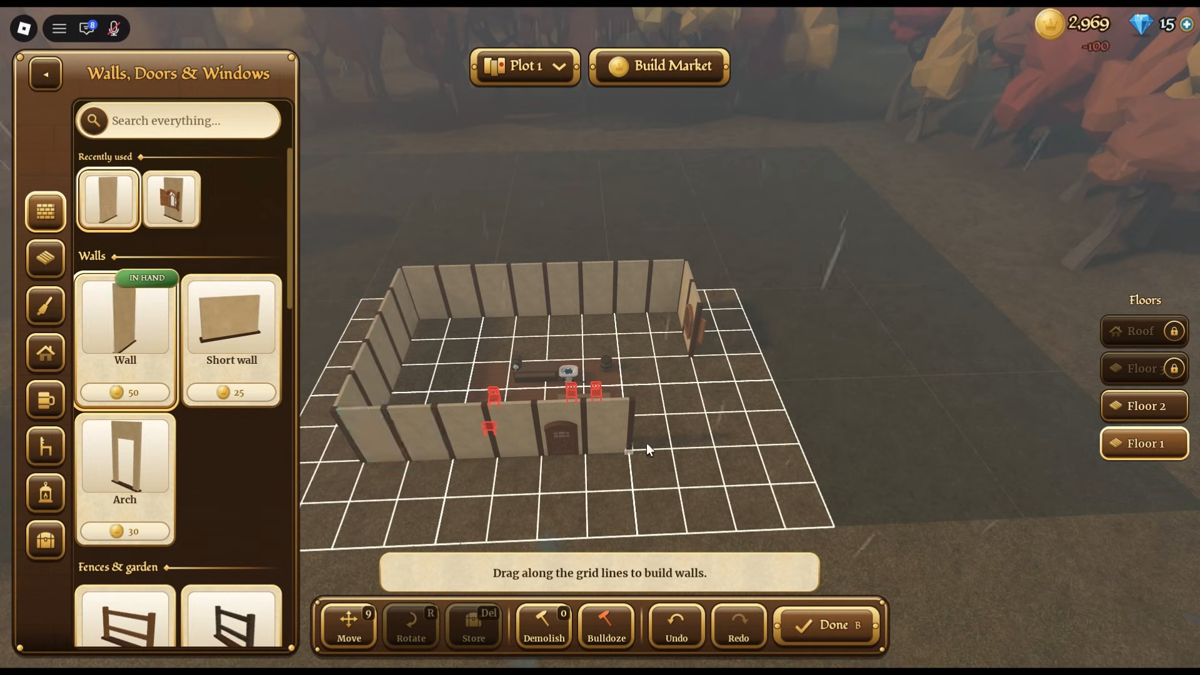
Click Build in the bottom right HUD. The catalog lists starter fixtures with fixed prices:
- Wall (50 Gold): Main exterior wall. Drag along grid lines to seal your perimeter.
- Short wall (25 Gold): Half-height partition for interior walls.
- Arch (30 Gold): Open doorway allowing guests through your wall boundary.
- Stool (100 Gold): Single-tile guest seat.
- Chair (200 Gold): Standard single seat.
- Bench (400 Gold): Multi-tile seating bench.
- Wall torch (100 Gold): Wall light. Press
[R]to rotate; hold[Shift]to lock height.
Check the starter wall catalog layout below:
Place at least one table and a stool or chair. Guests cannot order while standing; the HUD tracks your capacity as Seats <used>/<total>.
Pour the drink the guest ordered
When your status shows Open, patrons arrive based on the Guests/min rate in your lower left HUD.
- Watch the guest sit down: Look above their head for an order bubble, such as "They ordered Sarsaparilla."
- Walk to the bar taps: Approach the bar to open The Bar panel. The prompt reads:
Drag a tap handle down to pour. - Check barrel stock and pour:
- Water: Marked
Free, never runs dry. Sells for 1g at level 1. - Sarsaparilla: Shows barrel capacity (such as
145/150). Pouring uses stock. If low, clickFillor+10 10g. - Drag the tap handle down to pour. The filled mug goes onto your tray.
- Water: Marked
- Deliver the order: Walk to the seated guest and press
Eon the promptE — Guest / Serve Sarsaparilla. The guest takes the mug, pays the price plus any tip, and drinks.
Clear the mugs and free your tray
Finished drinks leave empty mugs on tables. Dirty tables prevent new patrons from sitting down.
- Approach the table: Look at the empty mug until you see
F — Mugs / Clear table. - Pick up the mug: Press
Fto move the dirty mug onto your tray. - Check tray space: You start with 3 tray slots. The HUD tracks your load (for example,
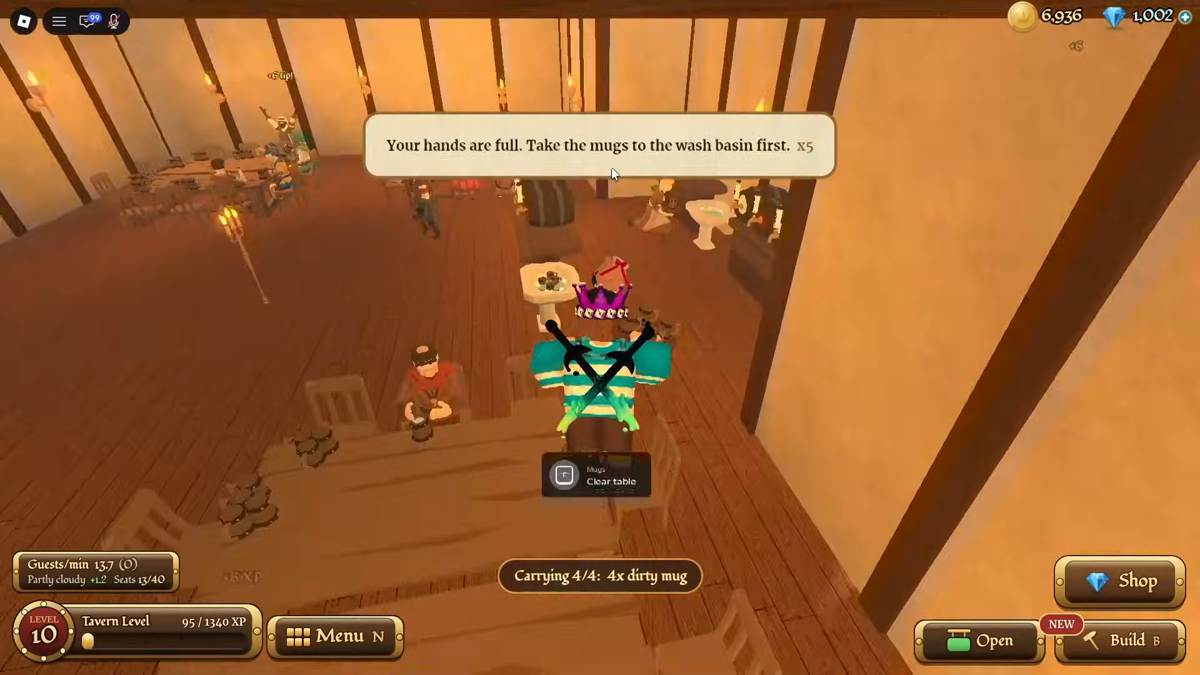
Carrying 3/4: 3x dirty mugwith an upgraded 4-slot tray). - Avoid full hands: If you try to clear dishes or grab drinks when full, the game shows:
Your hands are full. Take the mugs to the wash basin first. x5.
See the wash basin prompt and tray slot indicator below:
- Empty your tray at the wash basin: Walk to the wash basin inside your tavern and deposit the mugs. The exact interaction key and wash cycle duration were not recorded, but clearing your hands resets your carrying count to 0.
You can later unlock Steady Tray in the skill tree to gain +1 slot, raising base tray capacity from 3 to 4 items.
Read your first earnings report
Closing your tavern or finishing a shift displays The Night's Earnings report.
See the recorded line items on an earnings receipt below:
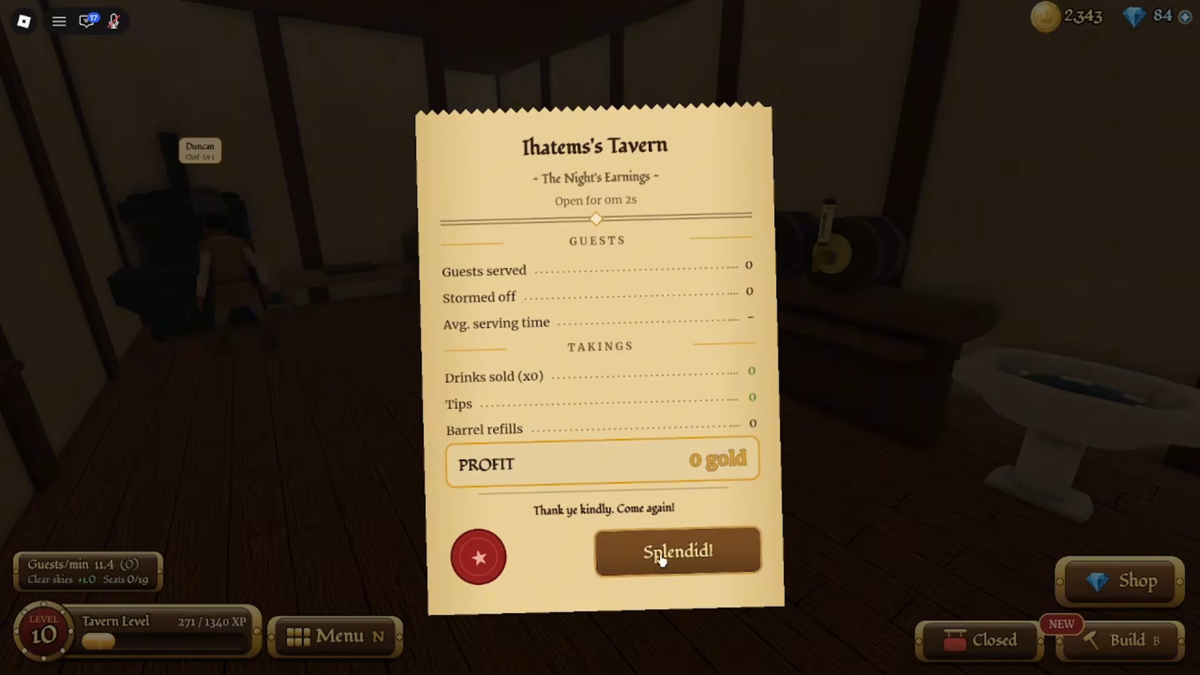
Note: The image above shows an earnings sheet opened after 2 seconds of service, so counts are zero. It serves to verify the game's official field names.
The report tracks two sections:
GUESTS
- Guests served: Patrons who received their ordered drinks.
- Stormed off: Patrons who left because wait time ran out.
- Avg. serving time: How long guests waited from ordering to delivery. The recorded sheet showed a dash and no unit, so treat the number as a comparison between nights, not a stopwatch.
TAKINGS
- Drinks sold (x
): Revenue from drink base prices (such as 1g water, 3g sarsaparilla). - Tips: Extra gold paid by satisfied customers upon quick delivery.
- Barrel refills: Gold spent refilling kegs (such as 10g per 10 sarsaparilla units).
The bottom row displays PROFIT, calculated as (Drinks sold + Tips) - Barrel refills. Click Splendid! to collect your funds and close the report.
Where your first rewards are
Do not rely only on early drink sales for coins. Two reward menus offer starting funds:
- Daily Rewards: On the main menu screen, marked by a red dot. Opening it awards login bonuses, though the full daily reward schedule was not recorded.
- Quests and Milestones: Open your quest window to
Quests > Milestones. Achievements trigger toast alerts when reaching targets (such asMilestone reached: Prospector (Bronze)! Mine 50 gems. Claim it in Quests > Milestones.orMilestone reached: Stargazer (Bronze)! Mine 10 gem asteroid crystals. Claim it in Quests > Milestones.). Claiming them gives free gems.
Check both menus after your first shift to grab starting bonuses before expanding your room or buying more furniture.