
Walls come first
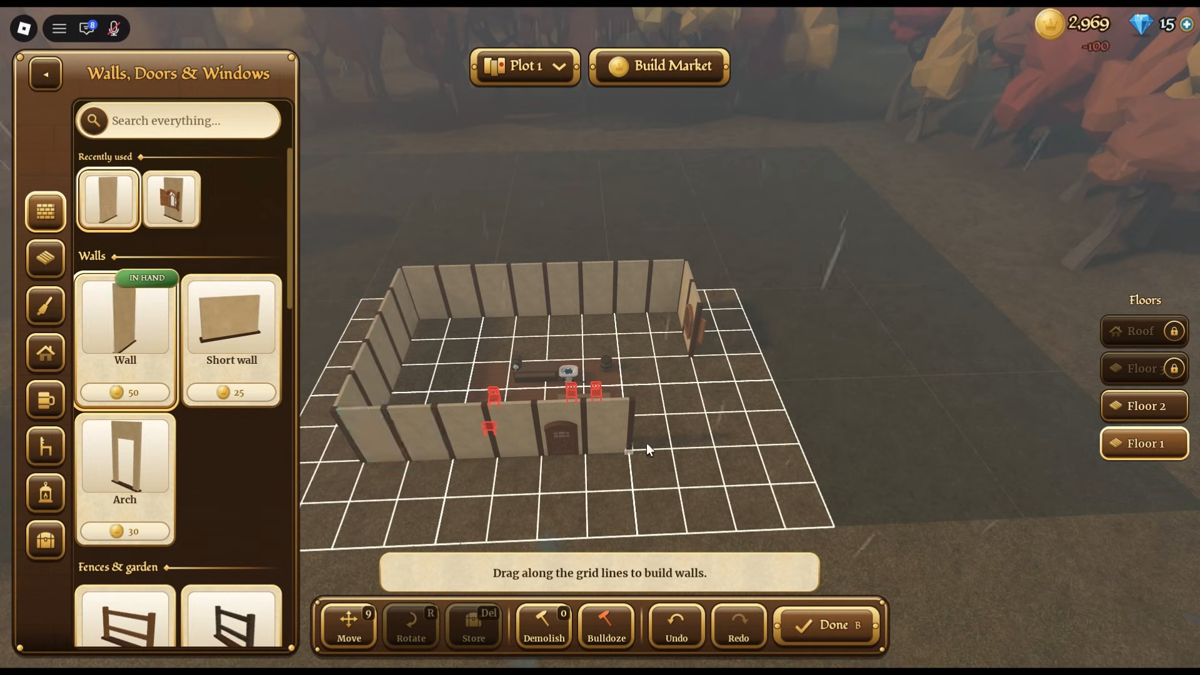
Your first job is raising an enclosed perimeter. When you enter build mode, the game prompts: Drag along the grid lines to build walls. Click and drag along visible plot lines to stretch wall sections. You do not place individual blocks; you drag along the grid to form continuous wall lengths.
Check your gold balance before dragging. Walls consume gold on placement:
| Structure Piece | Gold Cost | Category Panel | Purpose & Notes |
|---|---|---|---|
| Wall | 50 gold | Walls, Doors & Windows | Full-height exterior wall to enclose rooms |
| Short wall | 25 gold | Walls, Doors & Windows | Low partition wall for interior dividers |
| Arch | 30 gold | Walls, Doors & Windows | Open entryway that allows guest pathing |
An Arch costs 30 gold, while a standard Wall costs 50 gold. You need at least one Archway so guests and your character can walk inside. Sealing the entire perimeter with regular walls locks everyone out.
The bottom toolbar provides eight utility buttons: Move, Rotate, Store, Demolish, Bulldoze, Undo, and Redo, followed by Done to exit. You can toggle placement between Grid snapping and Free [Alt], and adjust sizing with 1x. If you misplace a section, tap Undo or select the piece and click Demolish.
Check the walls panel and construction grid below before committing your layout.
Roofs and floors
Once perimeter walls form a closed loop, switch the category panel to Roof. Leaving a building open to the sky keeps the room unopenable.
The roof panel provides four shapes:
- Gable: Pitched roof with two sloping sides meeting at a central ridge.
- Hip: Sloped roof on all four sides meeting at a top ridge.
- Lean-to: Single sloping roof plane for side additions.
- Flat: Horizontal flat roof surface.
In the roof customization interface, roof height defaults to Classic. Under the Clay tiles material line, Terracotta shows as IN HAND and Unlocked. When stretching a roof over walls, the bottom prompt reads Gable roof, 3 x 2 tiles: Terracotta [R] turn. Press R to rotate ridge orientation before placing it. To remove a roof section or leave an open courtyard without spending coins, select No roof, which is marked Free.
Review the roof selection panel and material settings shown below.
Look at the floor switcher on the upper-right side of the screen. The interface lists four tiers: Roof, Floor, Floor 2, and Floor 1. In a starter tavern, the upper tiers display a lock icon. You cannot place a second-story floor or elevate your roof until the system unlocks upper-level building permissions. Work strictly on Floor 1 until progression unlocks higher levels.
Furniture and light
A sealed building keeps weather out, but guests require seating before the game lets you flip the tavern sign to Open. Switch to Chairs & Tables to furnish the taproom.
The catalog lists three seating options alongside wall lighting:
| Item | Cost | Function | Placement Tip |
|---|---|---|---|
| Stool | 100 gold | Single-guest seat | Cheapest seating option for starter budgets |
| Chair | 200 gold | Single-guest seat with backrest | Mid-tier seat |
| Bench | 400 gold | Multi-guest communal seating | Accommodates multiple guests along tables |
| Wall torch | 100 gold | Ambient wall lighting | [R] rotate hold [Shift]: same height |
When you select Wall torch, the game prompts: Place Wall torch: 100 Gold [R] rotate hold [Shift]: same height. Holding Shift while moving your cursor along the wall locks vertical elevation, keeping sconces aligned neatly.
Catalog limits and missing data
While starter seats and the wall torch have confirmed in-game prices, several catalog costs were not recorded in the evidence:
- Tables: Table piece prices and footprints were not recorded.
- Kitchen Counters & Stoves: Kitchen interaction prompts exist (
E — Kitchen), but appliance purchase costs were not recorded. - Wash Basins & Bars: Service bars and wash basins appear in gameplay, but catalog unit costs were not recorded.
Do not overspend on benches early. Four stools cost 400 gold—the same as a single bench—giving flexible seating across your initial floor space.
Plots, upper floors and the Build Market
At the top of the build screen, you will see a dropdown labeled Plot 1 alongside a button for Build Market. These systems control expansion, multi-floor building, and sharing, but they operate under different rules.
Land expansion vs. upper floors
Expanding outward and building upward are separate mechanics:
- Upper floors: The right-hand menu shows
Floor 2andRoofaboveFloor 1. On starter taverns, these upper tiers are locked. Upward expansion requires progressing your tavern rank before multiple stories can be built. - Plot expansion: Players frequently ask how to expand plot boundaries (
Cara memperluas lahannya bagaimana?). The dropdown showsPlot 1, suggesting multiple plots or territory expansion. However, the exact expansion procedure, boundary costs, and level requirements were not verified in recorded gameplay evidence. Do not assume extra land unlocks automatically with gold.
Build Market and Game Passes: Share Pass vs. Tavern Pass
The Build Market button opens community build trading. Two distinct Game Passes exist in the ecosystem, and they serve different purposes:
- Share Pass (49 Robux): Grants the ability to sell custom designs on the Build Market. If you have an active Roblox Premium membership, the game listing states that Premium members receive the Share Pass for free. It is strictly a creative design-sharing pass.
- Tavern Pass (999 Robux): a separate game pass. The passes API records its name and price and nothing else, so what it unlocks was not verified — do not buy it expecting Build Market access, which is the Share Pass.
Focus on laying a tight starter room on Plot 1. Once your first-floor loop generates steady gold, you can investigate market blueprints and upper-tier renovations.